
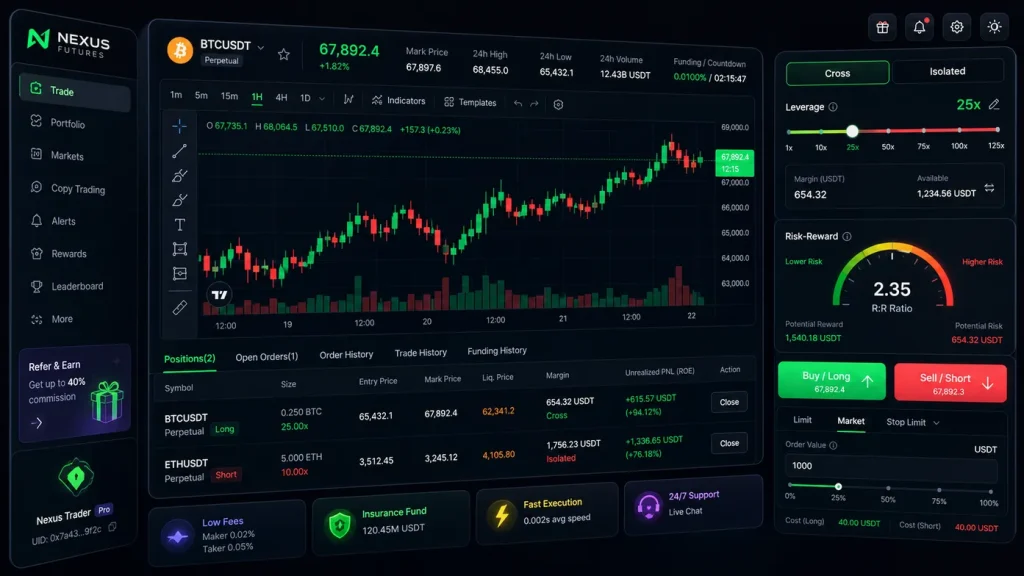
Leverage can magnify a good idea—or turn a small mistake into a costly one. If you’ve ever looked at the MEXC Futures screen and wondered which settings actually matter, this breakdown is for you. MEXC gives you powerful controls—Cross vs Isolated Margin, One-Way vs Hedge Mode, leverage up to 200x on select pairs, reduce-only, post-only, and built-in calculators—that decide how your risk and reward play out on every trade.

- 20% trading fee discount
- $30,050 signup bonus

- 20% fee cashback
- $60,000 futures bonus

- 20% fee cashback
- $8,000 bonus

- 20% trading fee discount
- $100 signup bonus
- $10,000 futures bonus

- 20% fee cashback
- $10,000 bonus

- 50% trading fee discount
- 20% fee cashback
- $6,200 futures bonus
This guide walks you through MEXC leverage settings end to end, with practical, repeatable workflows you can apply right away.
- Quick take:
- Cross vs Isolated determines where your risk is contained.
- One-Way vs Hedge Mode determines how you manage opposing positions.
- Your leverage number doesn’t change your edge—your stop, size, and margin allocation do.
- Use the MEXC calculator before placing orders to preview PnL and liquidation.
- New to futures? Favor small size, Isolated margin, and lower leverage while you learn the flow.
Ready to trade with lower fees and bigger perks? New accounts get 20% fee cashback and up to $8,000 in bonuses via this referral: Join MEXC with code mexc-CRYPTONEWER.
What “leverage” really does on MEXC
- Leverage increases your notional exposure using a smaller amount of margin. 10x means $100 of margin controls ~$1,000 in notional.
- Your risk comes from your stop-loss distance and your position size—not the leverage number itself. Leverage simply reduces the margin required to hold the position.
- Liquidation risk increases as you raise leverage because your maintenance-margin buffer shrinks.
Simple example:
– Account: $1,000
– Risk per trade: 1% ($10)
– Stop distance: 1%
– Position size: Risk / Stop = $10 / 0.01 = $1,000 notional
– If you set 5x leverage, you’ll need ~$200 margin to hold $1,000 notional. If you set 10x, you’ll need ~$100 margin. Your risk remains $10 if your stop executes as planned.
The edge is in defining risk first, then selecting the minimum leverage required to deploy that exact risk efficiently.
MEXC Leverage Settings Explained: Cross vs Isolated Margin
-
Isolated Margin
- Margin is ring-fenced to that single position.
- If the position is liquidated, it only affects the margin you placed there.
- Great for beginners, testing ideas, or trading highly volatile alts.
-
Cross Margin
- Your available balance backs the position. Profits from one position can offset losses on another.
- Can reduce the chance of liquidation on a single position, but spreads risk across your whole futures balance.
- Used by advanced traders who monitor the entire portfolio actively.
On MEXC, you can switch Cross/Isolated before opening a position. Changing while a position is open may require adjusting margin or closing/reopening—MEXC will display prompts. Check the top of the order panel for the toggle.
Guideline:
– Learning phase or fast-moving alts: Isolated
– Portfolio-level hedging or multi-position strategies: Cross
Position Mode: One-Way vs Hedge Mode
-
One-Way Mode
- You hold one net direction per symbol. New orders in the opposite direction reduce or close your position.
- Simple and clean for trend-following or scalping a single bias.
-
Hedge Mode
- You can hold long and short positions simultaneously on the same pair.
- Useful for basis trades, partial hedges, or managing entries/exits across timeframes.
Choose the mode that matches your plan. Many start with One-Way to keep execution straightforward, then move to Hedge Mode once they’re comfortable with risk.
Step-by-step: How to set leverage on MEXC (Web or App)
- Open Futures and select your market (e.g., BTCUSDT Perpetual).
- At the top of the order panel, choose Cross or Isolated margin.
- Click the leverage value (e.g., 20x) to open the slider.
- Drag to your desired leverage or type a number; confirm.
- Pick your order type (Limit/Market/Stop/Trigger).
- Set your position size and pre-set TP/SL if available.
- Use the calculator icon to preview PnL and liquidation price before placing.
- Optional safeguards: toggle Reduce-Only for exit orders; Post-Only for maker-only entries.
If you’re new, consider starting with 2–5x leverage on Isolated margin to get a feel for price swings and maintenance buffers.
Choosing leverage intelligently (with simple math)
- Decide risk per trade first (e.g., 0.5–1.0% of account).
- Choose a logical stop based on structure or volatility (e.g., below swing low, ATR-based, or recent consolidation).
- Compute position size: Position Size = (Account Balance × Risk%) / Stop Distance%
- Set the lowest leverage that allows your intended notional with a comfortable margin buffer.
Example:
– Account $2,000, risk 1% = $20 risk
– Stop distance 0.5% on BTC = 0.005
– Position Size = $2,000 × 0.01 / 0.005 = $4,000 notional
– If you pick 5x leverage, you’ll need about $800 margin to control $4,000. If you pick 10x, you’ll need ~$400 margin. Risk remains ~$20 if your stop holds.
Pro tip: Don’t use extra “free” capacity from high leverage to oversize. Keep position size tied to risk and stop distance.
Liquidation price, maintenance margin, and funding on MEXC
- Liquidation price is where the exchange force-closes the position to prevent negative balances. It depends on entry price, leverage, margin mode, fees, and the pair’s risk limits.
- Funding payments occur periodically between longs and shorts to keep the perpetual price near spot. It’s not a fixed fee and can change direction/in magnitude.
- Use the MEXC calculator before placing an order to preview:
- Liquidation price given your leverage/margin mode
- Estimated PnL at targets
- Required margin
Tip: If the calculator shows a liquidation price dangerously close to your entry, either lower leverage, widen the stop (if justified), or decrease size.
Order settings that quietly shape your risk
- Reduce-Only: Ensures the order only decreases or closes your position, preventing accidental flips.
- Post-Only: Guarantees maker-only placement for potential fee advantages; order will cancel if it would execute immediately.
- Time in Force: GTC/IOC/FOK—controls how your order persists or cancels.
- TP/SL on entry: Set both as soon as you open a trade; avoid managing risk after the fact.
- Trailing stop: Follows price to lock in gains while leaving room for trend continuation.
Maker/Taker fees and funding matter over time. Lower fees can be an edge, especially for active traders. You can get 20% fee cashback and up to $8,000 in bonuses by opening your account here: Claim 20% fee cashback on MEXC (code mexc-CRYPTONEWER).
Cross vs Isolated: when to switch
-
Stay Isolated if
- You’re experimenting with a new strategy
- You’re trading highly volatile micro-caps or news-driven assets
- You want to hard-cap the maximum you can lose on a single idea
-
Consider Cross if
- You’re managing multiple correlated positions
- You hedge and rebalance frequently
- You monitor positions closely and can add/remove margin proactively
If you often add margin “to save” a trade, pause and review the plan. It’s better to size correctly and accept the stop than to rescue poor entries.
Risk Limits and Tiers on MEXC
As your position size grows, MEXC increases maintenance margin requirements via risk tiers. Benefits include systemic safety and clearer margin expectations at scale. Before placing large orders, check the symbol’s Risk Limit page in the trading interface to understand:
– Maximum leverage available at your intended notional size
– How maintenance margin steps up as you scale
Scaling guidance:
– Scale notional only after the strategy proves edge across multiple market conditions.
– Each tier step changes liquidation math—re-run the calculator when sizing up.
Practical playbooks
-
New futures traders
- Isolated, 2–5x, pre-set TP/SL, single market focus (BTC or ETH)
- Aim for consistency over size; refine entries and exits
-
Swing traders
- Isolated or Cross depending on portfolio
- Moderate leverage (3–7x), structure-based stops, multi-day holds
-
Intraday scalpers
- One-Way for simplicity or Hedge Mode for bracket-style management
- Smaller stops, frequent entries—fees matter; use Post-Only where sensible
-
Hedgers
- Hedge Mode, Cross margin
- Opposing legs to dampen portfolio volatility during events or news
Common pitfalls to avoid
- Equating high leverage with higher odds of success—leverage only reduces required margin; it doesn’t improve your setup.
- Ignoring liquidation proximity—always check the calculator.
- Over-hedging in Hedge Mode—ending up flat but paying double fees/funding.
- Moving stops wider after entry—invalidates your plan and risk math.
- Averaging down into liquidation—if you scale, do so by plan and with hard invalidation.
FAQs: MEXC Leverage Settings Explained
-
Can I change leverage with an open position?
- Usually yes, but it affects maintenance margin and liquidation math. Review the prompts and re-check the calculator.
-
Does higher leverage increase fees?
- Trading fees apply to notional traded, not leverage. However, higher leverage often encourages larger or more frequent trades—fees can add up. Grab fee relief here: Open MEXC with code mexc-CRYPTONEWER for 20% cashback.
-
Cross vs Isolated—can I switch mid-trade?
- The platform may require adjustments; read the on-screen guidance. Safest practice is to set your mode before entry.
-
What’s a safe leverage for BTC or ETH?
- “Safe” depends on your stop distance and system. Many traders comfortably operate 2–5x while learning; pros adjust based on volatility regimes.
-
One-Way vs Hedge Mode—what’s better?
- Neither is “better.” One-Way is simpler; Hedge Mode is more flexible for complex strategies.
-
How do funding payments affect PnL?
- Funding is paid or received over intervals. Over long holds, it can materially add or subtract from your result—check the current rate on the symbol.
-
Will Reduce-Only prevent accidental position flips?
- Yes. Mark exits as Reduce-Only so they cannot increase exposure.
Fast checklist before every trade
- Confirm Cross/Isolated and Position Mode
- Set leverage low enough to give you breathing room
- Define risk first: stop distance and dollar risk
- Use the calculator for PnL and liquidation
- Place TP/SL immediately; use Reduce-Only for exits
- Size up only after consistent results at current size
If you want lower fees and stronger incentives while you practice, this promo helps: Start on MEXC with code mexc-CRYPTONEWER for 20% fee cashback + up to $8,000 bonus.
Risk reminder: Perpetual futures are complex and carry a high risk of rapid losses due to leverage. Trade with money you can afford to risk and use strict risk controls. Nothing here is financial advice; it’s educational guidance to help you understand the MEXC leverage settings and how they influence risk and reward.
Related posts:
 What is Bybit? A Powerful, No‑Nonsense Guide to the Exchange, Fees, and Features
 Proven Insights: How Blockchain Enables Peer-to-Peer Transactions at Internet Speed
 How to Start Trading on OKX Spot Market with Proven Steps to Trade Confidently
 Essential Guide to Current Blockchain Policies in South Korea for Builders and Investors