
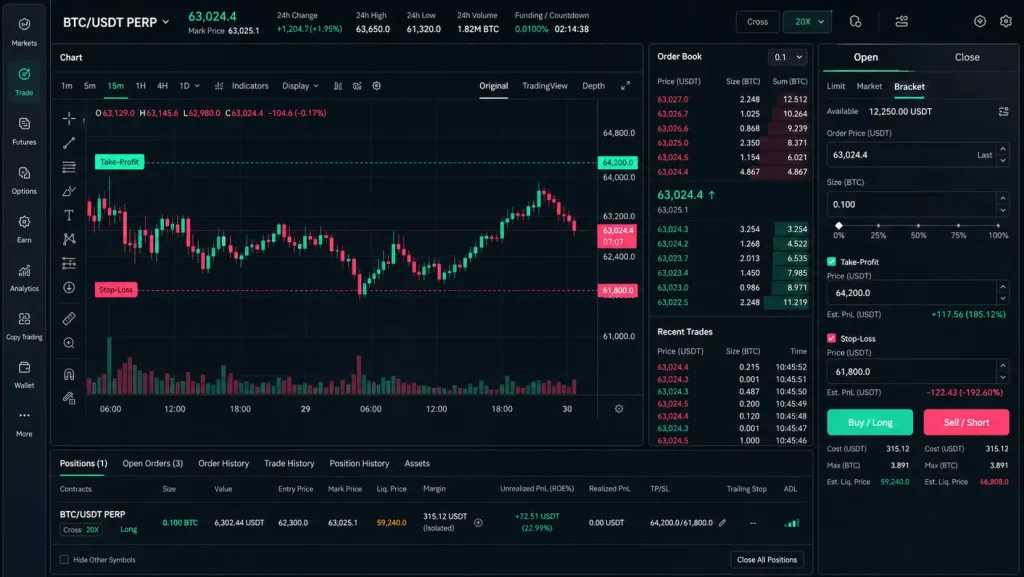
Trading without a safety net is just gambling. If you want consistency, you need to master stop-loss (SL) and take-profit (TP) orders. This guide shows you exactly how to use Stop-Loss and TP on OKX—on web and mobile—plus practical templates, advanced tips, and risk rules used by pros.

- 20% trading fee discount
- $30,050 signup bonus

- 20% fee cashback
- $60,000 futures bonus

- 20% trading fee discount
- $100 signup bonus
- $10,000 futures bonus

- 20% fee cashback
- $8,000 bonus

- 50% trading fee discount
- 20% fee cashback
- $6,200 futures bonus

- 20% fee cashback
- $10,000 bonus
Before we dive in, new users can lock in lower fees and a big welcome bonus. Join OKX with code CRYPTONEWER for 20% fee cashback and up to a $60,000 futures bonus: Join OKX with code CRYPTONEWER.
Why Stop-Loss and Take-Profit Matter on OKX
- Stop-Loss (SL): A protective order that exits your position when price reaches a defined level. It caps downside and enforces discipline.
- Take-Profit (TP): A target that books gains automatically when price reaches your objective.
- Together, TP/SL turn a prediction into a plan: clear entry, fixed risk, predefined reward.
On OKX, you can attach TP/SL when placing the order (a “bracket” order) or add them to an open position. You can also use conditional orders (including trailing stops) for more control.
OKX Order Building Blocks (Know These First)
- Trigger price source: Choose whether your TP/SL triggers from Last, Mark, or Index price. Many traders prefer Mark to reduce wick/noise triggers.
- Execution type: Market (fast execution, potential slippage) or Limit (price control, but may not fill in fast moves).
- Reduce-only: Ensures the order only decreases or closes an existing position—avoids accidental flips in hedge/one-way mode.
- Partial quantities: Scale out in layers by setting multiple TPs with smaller quantities.
- Time in Force (TIF): GTC (good till canceled), IOC, or FOK for limit orders.
Pro tip: When in doubt for SL, use Market with Mark trigger to ensure you’re out when your risk line is hit.
Quick-Start: How to Use Stop-Loss and TP on OKX (Web)
1) Place a bracket order with TP/SL
– Go to Trade > Spot or Derivatives (Perpetual/Futures).
– On the order panel, enter your order size and price.
– Toggle TP/SL (sometimes shown as “Take-profit/Stop-loss”).
– Choose trigger source (Last/Mark/Index). Mark is the defensive choice.
– Input TP and SL trigger levels. You can set execution as Market or Limit.
– Confirm Reduce-only for exits (especially on futures) to avoid flipping.
– Place the order. Once filled, OKX tracks the attached TP/SL.
2) Add TP/SL to an existing position
– Open the Positions panel.
– In the TP/SL column, click Set.
– Choose trigger source, execution type, price levels, and quantity.
– For scaling out, add multiple TP lines with different quantities.
– Save. Your TP/SL are now live.
3) Conditional orders and OCO-style logic
– Choose Conditional in the order panel.
– Define the Trigger price and the Order details (Market or Limit, quantity).
– Enable Close position or Reduce-only for exits.
– Create both a TP and an SL conditional. If one side fills, manually cancel the other if not using a bracket. OKX’s position TP/SL tool can handle mutual exclusivity for you.
4) Trailing stop on OKX
– In Conditional orders or from Position TP/SL tools, select Trailing stop.
– Set Callback rate (%) and an optional Activation price (arming level).
– When price moves in your favor, the stop trails at the set distance. If price reverses by the callback amount, you exit.
How to Use Stop-Loss and TP on OKX (Mobile App)
- From Trade, pick Spot or Futures and your pair/contract.
- Enter size and price, then toggle TP/SL on the order form.
- Set TP and SL with your preferred trigger source (Mark is common) and execution type.
- Place the order.
- For open positions, go to Positions > TP/SL > Set, then configure levels and quantities.
- For trailing stop, pick Trailing under Conditional or within the position’s TP/SL settings.
Concrete Examples You Can Copy
A) Spot buy example (BTC/USDT)
- Plan: Buy BTC at 62,000; SL at 60,760 (just below support); TP at 65,500.
- Web/Mobile steps:
- Select Spot > BTC/USDT.
- Enter a Limit Buy at 62,000.
- Toggle TP/SL. Trigger source: Mark. SL: 60,760 (Market). TP: 65,500 (Limit).
- Place order. After fill, TP/SL are active.
Why it works: Your risk per BTC is 1,240 USDT. If you only want to risk 620 USDT, buy 0.5 BTC. Fixed risk; clear target.
B) Perp futures long example (BTC-USDT Perp)
- Account: 5,000 USDT, isolated margin, 10× leverage.
- Plan: Long at 62,000; SL at 60,800; TP at 65,000. Trigger source: Mark.
- Stop distance: 1,200. Risk 1% of equity = 50 USDT. Position size ≈ Risk / (Stop distance / Price)
- For a Market SL, approximate contract size by risk per coin: 1,200 USDT per BTC risk. With 50 USDT risk, size ≈ 50 / 1,200 ≈ 0.0417 BTC.
- Steps:
- Enter Buy/Long 0.0417 BTC at 62,000.
- Toggle TP/SL. SL: 60,800 (Market, Reduce-only). TP: 65,000 (Limit, Reduce-only).
- Place order.
Scaling idea: Add partial TPs—e.g., 0.02 BTC at 64,000, 0.01 BTC at 65,000, 0.0117 BTC trailing after break-even.
C) Short example with trailing stop
- Plan: Short ETH at 3,400; initial SL at 3,480; use a 1.5% trailing stop after price moves +1% in your favor.
- Steps:
- Place Sell/Short at 3,400 with SL 3,480 (Market, Reduce-only), TP 3,300.
- Add a trailing stop conditional: Activation 3,366 (≈1% move), Callback 1.5%.
- If price drops from 3,366 to 3,316, then bounces 1.5% upward, the trailing stop fires.
Advanced TP/SL Tactics That Work on OKX
- Multiple TPs, one SL: Scale out into strength. Example: 40% at TP1, 40% at TP2, 20% runners on a trailing stop.
- Breakeven stop: After TP1 hits, move SL to entry or slightly in profit (Reduce-only) to create a “free trade.”
- ATR-based stops: Use Average True Range. If ATR on 1h is 120, set SL ≈ 1–1.5× ATR beyond structure to avoid noise. Long example: SL = swing low − 1.2×ATR.
- Structure-first, math-second: Identify key swing highs/lows; then compute size from stop distance so your dollar risk stays constant.
- Mark vs Last trigger: Use Mark for fairness; switch to Last for breakout tactics if liquidity is deep and wicks aren’t an issue.
- Hedge mode vs One-way: In hedge mode you can hold longs and shorts. Always tick Reduce-only for exits so a TP/SL never opens a new opposing position.
- Cross vs Isolated: Isolated confines risk to the position’s margin; Cross uses whole account balance. Wider SLs on Cross may be safer near liquidation levels.
Common Pitfalls (And How to Avoid Them)
- Forgetting Reduce-only: Your TP might accidentally open a reverse position in one-way mode. Always check Reduce-only for exits.
- SL as Limit only: A limit stop might not fill during a fast dump. Use Market for the SL if your priority is certainty over slippage.
- Wrong trigger source: A wick on Last could take you out early; a Mark trigger could keep you in. Align trigger source with your strategy.
- No quantity on TPs: If you set multiple TPs, ensure each has a quantity assigned.
- Over-leveraging: Your SL won’t save you from bad sizing. Size the position based on your stop distance and risk budget.
- Gaps and slippage: No exchange can guarantee fills at your exact stop in a gap. Plan for slippage in volatile markets.
A Repeatable Risk Framework
- Choose a fixed R% risk per trade (0.5–1.0% is common).
- Position size = (Account size × R%) / (Stop distance in price units).
- Reward-to-risk (RR): Aim for at least 1.5–2.0× on average.
- Pre-commit: Entry, SL, and TP are set before placing the order.
- Review: After each trade, log whether SL or TP was hit and by which trigger source.
Template example:
– Account: 8,000 USDT; Risk: 1% = 80 USDT.
– Setup: Long SOL at 140; SL 136 (distance 4); TP 150.
– Size ≈ 80 / 4 = 20 SOL. Enter; set SL to Market with Mark trigger; TP Limit split 10 SOL at 148, 10 SOL at 150.
OKX-Specific Tips You’ll Use Daily
- Position panel shortcuts: Click TP/SL directly in the position row to edit quickly.
- Partial close button: Instantly close 25%/50%/75%/100% at market; useful in news spikes.
- TIF with TP: For TP Limits, GTC is fine; if you want precise exits only when touched, consider FOK/IOC depending on liquidity.
- Funding impacts on perps: If you plan to hold, factor funding; a TP might sit near a funding window—consider round numbers just below/above common clusters.
- Notifications: Enable order/position alerts so you know when TP/SL fire.
FAQs: How to Use Stop-Loss and TP on OKX
- Can I set TP/SL before entry fills? Yes—use the TP/SL toggle to attach them as a bracket.
- Do TP/SL work on Spot? Yes. Stops sell your holdings when triggered.
- Are stops guaranteed? No. In extreme volatility, you may get slippage.
- Can I use both TP and trailing stop? Yes. Many traders set a first TP, then switch the remainder to a trailing stop.
- Will TP/SL add margin? TP/SL marked Reduce-only simply close or reduce the position; they don’t add new exposure.
Save on Fees While You Learn
If you’re just setting up your OKX account or want a fresh start, you can trade smarter and cheaper by joining with our partner code. You’ll get 20% fee cashback and up to a $60,000 futures bonus. Claim it here: Join OKX with code CRYPTONEWER.
Tip: Lower fees improve your net RR and make stop-based strategies more forgiving, especially when scaling in and out.
A Practical Checklist Before Every Trade
- Defined entry, SL, and TP? Check.
- Size calculated from SL distance and risk budget? Check.
- Trigger source set (Mark/Last/Index)? Check.
- SL execution as Market (or Limit if that’s intentional)? Check.
- TPs split into logical partials? Check.
- Reduce-only on all exits? Check.
- Alerts on? Journal updated? Check.
Master these steps and you’ll not only understand how to use Stop-Loss and TP on OKX—you’ll turn your ideas into disciplined, repeatable trades. And if you haven’t yet, don’t forget to secure the fee discount and futures bonus: Join OKX with code CRYPTONEWER.
Related posts:
 What is the AERO (AERO) Coin and how to buy — Essential 2026 guide
 Actionable Bitget Mobile App Full Trading Guide for Pro-Level Trading on the Go
 What is the MELANIA (MELANIA) Coin, and how to buy — No‑Nonsense Guide
 What is the PIGGY(Piggycell) Coin, and how to buy — a hands‑on, step‑by‑step guide for 2026