
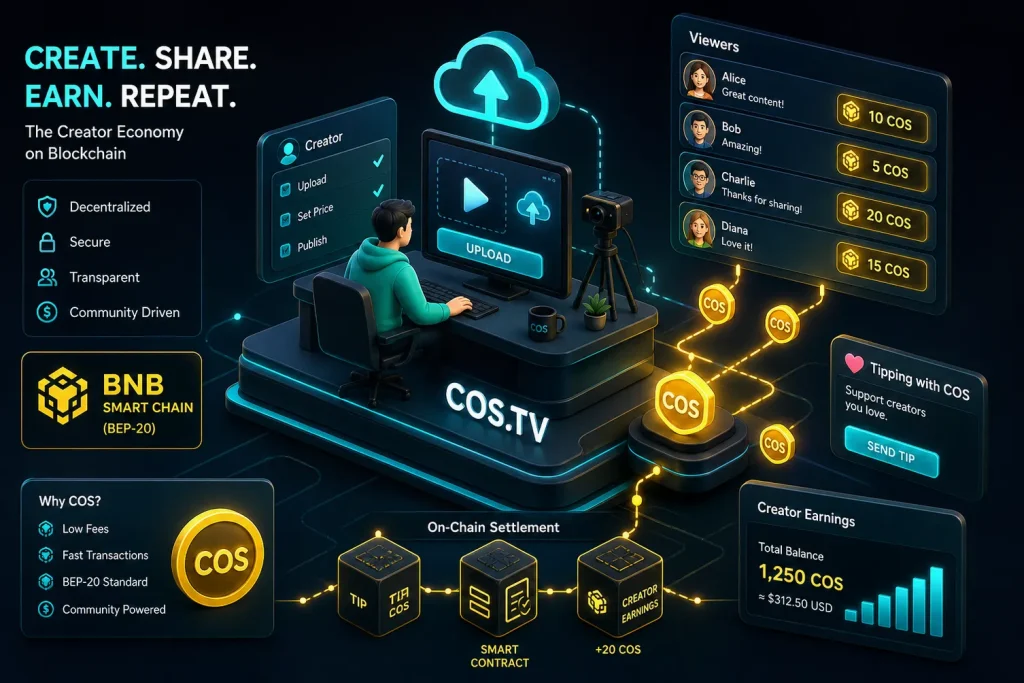
If you’ve heard about COS, the token behind the Contentos ecosystem and the COS.TV video platform, you’re probably asking two things: what exactly does COS do, and how can I buy it safely today? This guide gives you the essentials, verified with up‑to‑date sources, and walks you through a clean step‑by‑step purchase flow on Binance.

- 20% trading fee discount
- $100 signup bonus
- $10,000 futures bonus

- 50% trading fee discount
- 20% fee cashback
- $6,200 futures bonus

- 20% fee cashback
- $60,000 futures bonus

- 20% trading fee discount
- $30,050 signup bonus

- Bonus pack worth $100–$1,500 USDT
- Fee discount

- 20% fee cashback
- $8,000 bonus

- 20% fee cashback
- $10,000 bonus
Quick facts
– COS is the native utility token of Contentos, a blockchain project focused on rewarding digital content creation, distribution, and engagement. (contentos.io)
– The best‑known dApp in the ecosystem is COS.TV, a Web3 video platform where creators and viewers can earn in COS. (cos.tv)
– COS commonly trades on Binance via the COS/USDT pair; withdrawals typically use the BNB Smart Chain (BEP‑20) network. (coingecko.com)
– The BEP‑20 contract for COS is 0x96dd399f9c3afda1f194182f71600f1b65946501 (helpful for adding the token in wallets like MetaMask). (goto.bscscan.com)
What is Contentos (COS)?
Contentos is a public blockchain designed for digital content. Its mission: let creators publish, distribute, and monetize their work in a transparent way, with rewards and transactions recorded on‑chain. COS is the native asset that powers payments, rewards, and other interactions within the network. The project’s official documentation and profiles consistently describe COS as the token used to incentive positive contributions across the ecosystem.
The most visible app in this ecosystem is COS.TV, a creator‑focused platform where uploading, engaging, and community features tie back to COS token incentives. If you want to see Contentos in action, browsing COS.TV gives a practical feel for how creators and viewers interact in a tokenized environment.
Contentos has also been supported historically by Binance Labs, which publicly announced its investment to help the project develop its tech stack and global community. This background matters mainly to understand early ecosystem traction and listings; it’s not investment advice. (medium.com)
Which network does COS use? (BEP‑20, with an important 2026 update)
Today, most centralized exchanges route COS withdrawals and deposits through BNB Smart Chain (BEP‑20). The verified BEP‑20 contract is 0x96dd399f9c3afda1f194182f71600f1b65946501, which you can use to add the token to EVM wallets like MetaMask.
Why this matters: some exchanges historically supported COS on multiple networks (e.g., ERC‑20 and BEP‑20). In March 2026, Binance TH explicitly ceased ERC‑20 deposits and withdrawals for COS while continuing support on BNB Smart Chain—clear evidence of the current BEP‑20 standard on major venues. Always double‑check the “network” field before transferring. (binance.th)
If you plan to self‑custody, connecting MetaMask to BNB Smart Chain is straightforward via official how‑tos from Binance Academy or CoinMarketCap Academy. Once BSC is added, you can “Add Custom Token” with the COS contract above to see your balance. (academy.binance.com)
Where can you buy COS?
COS trades on multiple exchanges, with Binance consistently cited by market trackers as the primary venue and COS/USDT as the most liquid pair. This means most buyers acquire USDT first and then swap it to COS.
Step‑by‑Step: How to buy COS on Binance (works globally where Binance is available)
1) Create and verify your account
– Use this partner signup link: Register on Binance with code CRYPTONEWER to unlock a 20% trading‑fee discount plus up to $10,000 in benefits. Complete identity verification (KYC) for higher limits and local fiat channels. (Offer per Binance referral program; see landing page.)
2) Add funds
– Fiat on‑ramp: Depending on your region, you can deposit via card, bank transfer, or P2P to get USDT quickly. Binance’s official “how to buy Contentos” pages explain the flow (the process is identical whether you buy USDT first or purchase COS directly when available in your region). (binance.tr)
– Crypto deposit: Already hold crypto elsewhere? Deposit USDT, BTC, or other supported assets into your Binance wallet to trade into COS.
3) Trade USDT → COS
– On Binance Spot, search “COS” and choose the COS/USDT market. Place a market order for speed or a limit order to control price. Liquidity is generally best on the USDT pair.
4) Secure your COS
– Keep COS on Binance if you actively trade, or withdraw to a self‑custody wallet. If withdrawing, select the BNB Smart Chain (BEP‑20) network and verify the recipient address. For viewing in MetaMask, add BSC and the COS token contract to your wallet.
Pro tip: Fees on BNB Smart Chain are typically low, but you’ll need a tiny amount of BNB in your wallet for gas if you plan to move COS around after withdrawing.
COS use cases you’ll actually notice
- Creator rewards and platform incentives on COS.TV: creators can earn from engagement, while certain viewer actions may be rewarded during campaigns. COS functions as the in‑ecosystem currency for these interactions.
- Payments and transfers inside the Contentos network: COS is the native settlement asset for on‑chain activity defined in the project’s economic design.
Smart wallet setup for COS
- MetaMask (EVM): Add BNB Smart Chain, then “Import Token” with the COS BEP‑20 contract. Your address is the same as your ETH address, but the network must be BSC to see tokens.
- Hardware wallets: Ledger and others can manage BEP‑20 assets when used with MetaMask or compatible apps; check your device docs and ensure you’ve switched to the BSC network before sending. (General guidance; consult official wallet instructions.) (ledger.com)
Safety checklist every buyer should follow
– Always match token contract addresses when adding assets to wallets: for COS on BSC, that’s 0x96dd399f9c3afda1f194182f71600f1b65946501.
– On withdrawals, double‑check the network. In 2026, Binance TH removed ERC‑20 for COS; other venues may vary, but BSC is the prevailing choice. Selecting the wrong network can delay or risk funds.
– Prefer limit orders for tight control on entry price, especially during volatile sessions; USDT pairs usually offer deeper liquidity for altcoin purchases.
Why buyers choose Binance for COS
- Deep liquidity on COS/USDT reduces slippage for most order sizes compared to smaller venues, based on market‑tracker data.
- Multiple fiat ramps (card, bank transfer, P2P) simplify the first purchase.
- Promotions for new users: Binance — code CRYPTONEWER currently advertises a 20% fee discount plus up to $10,000 in benefits via the referral link.
Frequently asked questions about COS
Is COS an ERC‑20 or BEP‑20 token?
– On exchanges today, BNB Smart Chain (BEP‑20) is the standard for COS transfers. Some regional exchanges used to support ERC‑20 bridges, but support has shifted toward BSC (e.g., the March 20, 2026 Binance TH notice). Always confirm the network in your deposit/withdraw screen.
How do I add COS to MetaMask?
– Add BNB Smart Chain to MetaMask (one‑click in the Networks list), then import the COS token using the BEP‑20 contract 0x96dd399f9c3afda1f194182f71600f1b65946501.
What is COS actually used for?
– It powers on‑chain payments, rewards, and incentives in the Contentos ecosystem, including creator‑platform interactions on COS.TV. The whitepaper documents how contributions (creation, curation, storage, etc.) can be rewarded in COS.
Where can I read more from official sources?
– Contentos whitepaper and docs for token utility and design.
– COS.TV for the live content platform.
– Market data and trading venues via major trackers if you compare liquidity before buying.
Final step: put it all together
- Open your account with the partner link: Join Binance with code CRYPTONEWER for 20% fee savings and up to $10,000 in listed benefits.
- Acquire USDT via card, bank, or P2P; then trade COS/USDT on Spot.
- If you self‑custody, withdraw on BNB Smart Chain (BEP‑20), add COS to MetaMask with the verified contract, and keep a little BNB for fees.
Risk note: Crypto assets are volatile. Nothing here is financial advice; always DYOR and only use reputable, official links and verified contract addresses.
Related posts:
 Proven strategies for Binance fee discounts with BNB
 What is the SCRT(Secret) Coin, and how to buy — Actionable, up‑to‑date guide
 The History of Blockchain: Before and After Bitcoin — An Essential Guide to How We Got Here
 What is Ethereum(ETH) Essential Guide to Smart Contracts, Gas, Staking, and Layer 2