
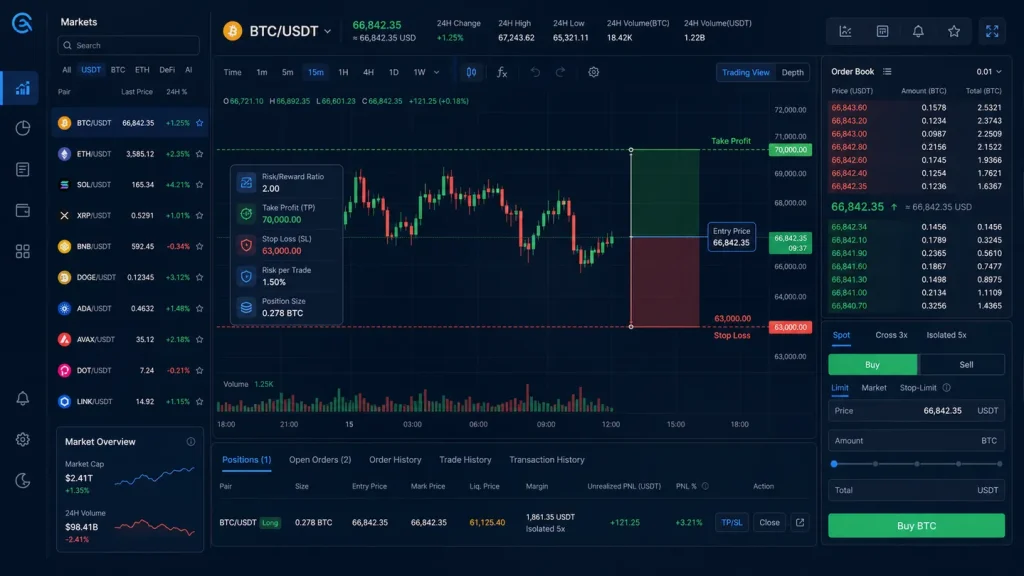
Knowing how to set TP/SL orders on CoinEx gives a trader a practical way to define both upside and downside before market volatility takes over. A take-profit (TP) order is designed to close a position after price reaches a target. A stop-loss (SL) order is designed to limit loss when price moves in the wrong direction. Together, they turn a rough trade idea into a measurable plan.

- 20% trading fee discount
- $100 signup bonus
- $10,000 futures bonus

- 20% fee cashback
- $60,000 futures bonus

- 50% trading fee discount
- 20% fee cashback
- $6,200 futures bonus

- 20% trading fee discount
- $30,050 signup bonus

- 20% fee cashback
- $10,000 bonus

- Bonus pack worth $100–$1,500 USDT
- Fee discount

- 20% fee cashback
- $8,000 bonus
If you are new to the platform, register through CoinEx with referral code mhz7w. Eligible users can access a fee discount and a chance to receive up to $1,500 in bonuses, subject to CoinEx’s current promotion rules and eligibility requirements.
Important: TP/SL orders are risk-management tools, not guarantees. In a fast-moving market, the final execution price can differ from the stop trigger price because of slippage, liquidity, or rapid price gaps.
What TP and SL Mean on CoinEx

The two instructions serve different purposes:
- Take Profit: Locks in a planned gain when the market reaches your selected target.
- Stop Loss: Places an exit instruction intended to cap a loss at a predefined level.
- Trigger price: The market price that activates your TP or SL instruction.
- Order price: Depending on the order type, the price used after triggering—often a market order or a specified limit price.
For example, suppose you buy BTC at $60,000. You may decide that $63,000 is a reasonable target based on a resistance level, while $58,800 is the point where your original idea is invalid. Rather than watching every candle, you can configure a TP at $63,000 and an SL at $58,800.
The exact labels and available choices can vary between Spot Trading and Futures Trading in CoinEx. Always read the order panel carefully and confirm whether your instruction will trigger a market or limit order.
Before You Set a CoinEx Take-Profit and Stop-Loss Order
A good TP/SL setup begins with the trade plan—not with random percentages. Before opening the order screen, determine these four items:
- Entry price: Where you expect to enter the market.
- Invalidation level: The price that proves your analysis was wrong. This is usually the logical home for the stop loss.
- Profit target: A realistic target near a resistance, support, or measured technical level.
- Position size: The amount you can trade while keeping the potential loss within your personal risk limit.
Many traders use a risk-to-reward ratio to check whether the trade is worthwhile. If your entry is $60,000, your stop is $59,000, and your target is $62,000, you are risking $1,000 per BTC to seek $2,000 per BTC—a 1:2 risk-to-reward ratio. It does not make the trade certain, but it makes the decision easier to evaluate.
Avoid setting an SL exactly on an obvious round number, such as $60,000, if that level is likely to be tested repeatedly. Consider the asset’s volatility, nearby support and resistance, and the spread between trigger and execution. A stop that is too tight may be triggered by ordinary market noise.
How to Set TP/SL Orders on CoinEx for Spot Trading
For a typical CoinEx spot trade, follow this workflow:
- Log in to your CoinEx account and open the Spot Trading market for the pair you want to trade, such as BTC/USDT.
- Select whether you are planning to buy or sell. In a spot position you already hold, a TP/SL sell order is generally used to manage the coins you own.
- Find the order type or advanced-order area that includes Stop Limit, Stop Market, or a TP/SL-style option. The wording may differ with interface updates.
- Enter the trigger price—the level at which CoinEx should activate the order.
- Choose the execution method. A market execution prioritizes filling once triggered, while a limit execution gives you price control but may not fill if the market moves away too quickly.
- Enter the amount of the asset to sell or buy, then carefully review the values.
- Submit the order and verify that it appears under Current Orders or the relevant order-management tab.
For spot holders, a common approach is to create a take-profit sell order above the current market price and a protective stop instruction below it. Check that the total amount allocated across open orders does not exceed your available balance. If one order fills, review and cancel any remaining conflicting order if it has not been automatically handled by the selected order mechanism.
Setting TP/SL on CoinEx Futures
CoinEx futures trading allows traders to manage long and short positions, but leverage increases both potential gains and potential losses. This makes the CoinEx TP/SL order especially important.
After opening a futures position, locate the Positions panel. Look for a control labeled TP/SL, Take Profit/Stop Loss, or a similar position-management option. Then:
- Select the position you want to protect.
- Set a take-profit trigger price. For a long position, this is normally above entry; for a short position, it is normally below entry.
- Set a stop-loss trigger price. For a long position, it is normally below entry; for a short position, it is normally above entry.
- Select the quantity or percentage of the position to close. You can often use partial TP/SL levels to scale out gradually.
- Confirm the trigger source shown in the panel, such as Last Price, Mark Price, or Index Price, if that choice is available.
- Review the order details and save the setup.
The trigger source matters. Futures markets can experience short-lived price wicks, while mark price is often used to help calculate liquidation and can behave differently from the last traded price. Read CoinEx’s live trading rules and the definitions displayed in the interface before relying on a trigger setting.
Example: TP/SL Setup for a Long Position
Imagine a trader opens a BTC perpetual long at $60,000. The trader identifies support around $59,200 and resistance near $62,000.
| Trade component | Example setting | Reasoning |
|---|---|---|
| Entry | $60,000 | Planned long entry |
| Stop loss | $59,100 | Below the identified support zone |
| Take profit | $61,800 | Slightly below resistance to improve the chance of execution |
| Position close | 100% | Exits the full position when either plan is triggered |
This is only an illustration, not a price prediction or trading recommendation. The same framework works for a short position in reverse: target lower support for profit and place the stop above the invalidation or resistance area.
Common TP/SL Mistakes to Avoid
Using liquidation as the stop loss. Liquidation is not a trade-management strategy. On leveraged futures, it can lead to a much larger loss and may occur before you can react. Set an intentional SL well before liquidation becomes relevant.
Ignoring fees and slippage. Your displayed target is not always your net result. Trading fees, funding fees on perpetual futures, and slippage can affect actual P&L.
Moving the stop farther away emotionally. If a stop was based on a valid invalidation point, widening it after price moves against you changes the risk of the trade. Decide whether the original analysis is truly invalid or whether emotion is driving the adjustment.
Setting both values without checking direction. For a long, TP is typically higher and SL lower. For a short, TP is typically lower and SL higher. Verify this before confirmation.
Forgetting to monitor open orders. Cancelled positions, changed balances, partial fills, or strategy changes can leave outdated instructions active. Review the Open Orders and Positions sections regularly.
Practical Checklist Before You Confirm
Use this quick checklist every time you create a CoinEx take-profit stop-loss order:
- Is the order for the correct trading pair?
- Did you choose long/short or buy/sell correctly?
- Is the trigger price on the correct side of your entry?
- Are you using market or limit execution intentionally?
- Does the order amount match the position size you want to close?
- Have you checked the trigger-price source for futures?
- Have you allowed for fees, funding, volatility, and possible slippage?
- Can you see the instruction in CoinEx’s active order or position-management area?
A structured TP/SL workflow makes it easier to trade with consistency rather than reacting to every sudden candle. Start with smaller position sizes while learning the interface, and use CoinEx’s current help materials for product-specific details, since menus, features, and order rules can change over time.
Ready to set up an account? Use CoinEx referral mhz7w for fee-discount eligibility and a $1,500 bonus chance.
Related posts:
 Top Blockchain Certifications: Powerful Paths to Build Real Web3 Skills
 Proven Insights: How Blockchain Enables Peer-to-Peer Transactions at Internet Speed
 Can Blockchain Help Prevent Fraud? Powerful Ways Blockchain Improves Trust
 ICO vs IEO vs IDO: What’s the Difference? An Essential Breakdown for Crypto Investors