A reliable deposit process is the foundation of smooth trading. This step-by-step guide shows you exactly how to deposit crypto into OKX, avoid costly mistakes, and confirm your funds land in the correct account. Whether you are transferring from another exchange or a self-custody wallet, you will learn best practices, fees to expect, and network choices that can save you time and money.

- 20% trading fee discount
- $100 signup bonus
- $10,000 futures bonus

- 20% fee cashback
- $8,000 bonus

- 20% fee cashback
- $60,000 futures bonus

- 50% trading fee discount
- 20% fee cashback
- $6,200 futures bonus

- 20% fee cashback
- $10,000 bonus

- 20% trading fee discount
- $30,050 signup bonus
Quick start offer — Use code CRYPTONEWER with the official sign-up link to get 20% fee cashback and up to $60,000 futures bonus: Join OKX with code CRYPTONEWER
What you will learn
- The fastest route to deposit crypto into OKX on web and mobile
- How to choose the right network for BTC, ETH, USDT, and other assets
- How to read deposit addresses, tags, and memos safely
- Typical confirmation times and minimum deposit amounts
- Troubleshooting pending deposits and common mistakes to avoid
- How to move funds from your Funding account to Trading account inside OKX
Understanding OKX accounts and deposit flow
- Funding account: This is where crypto deposits first arrive by default. Think of it as your wallet within OKX.
- Trading account: Where you actively trade spot, margin, and derivatives. Moving crypto from Funding to Trading is instant and free.
- Sub-accounts: Optional for teams or strategy separation. Each sub-account can have its own deposit address for many assets.
You can deposit directly to a specific account if available on the deposit screen or simply transfer internally later via Assets > Transfer.
Join OKX and activate your bonus
- Create your account and verify email or phone.
- On sign-up or in the referral section, enter code CRYPTONEWER.
- Use this link to auto-apply the code: OKX signup link with CRYPTONEWER
- Benefit highlights: 20% fee cashback and up to $60,000 futures bonus for new users who meet promo conditions.
How to deposit crypto into OKX on the web
1) Log in to your OKX account.
2) Go to Assets > Deposit.
3) Choose the coin or token you want to deposit (e.g., BTC, ETH, USDT).
4) Select the network. This is critical; the network you pick must match the network used by the sending wallet or exchange.
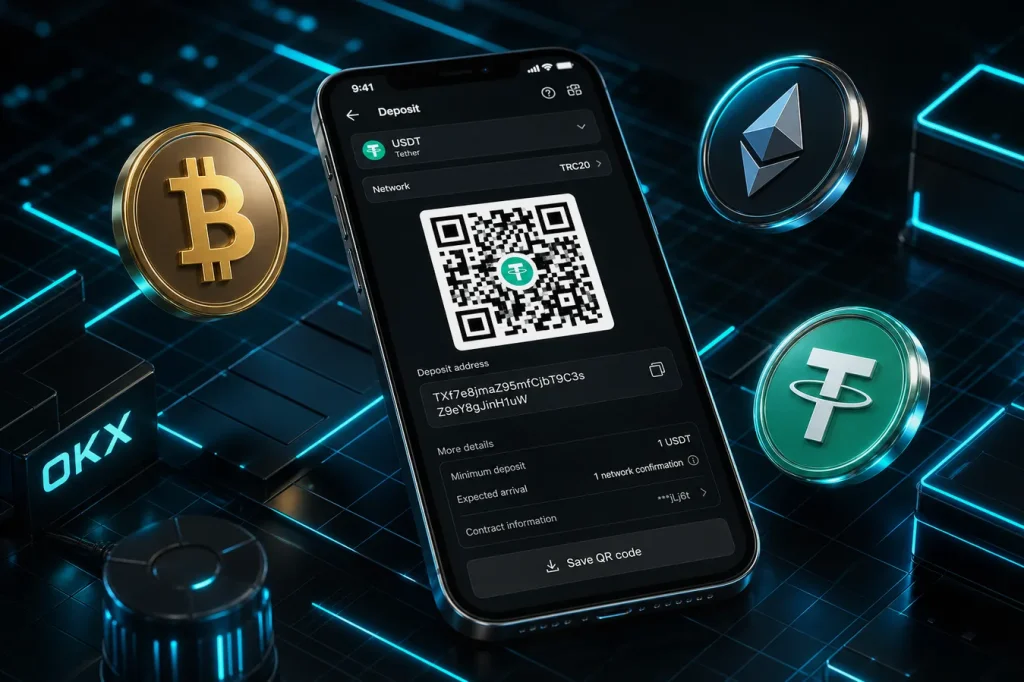
5) Copy the deposit address (and tag or memo if required) or scan the QR code.
6) From your external wallet or exchange, initiate the transfer to that exact address and network.
7) Wait for network confirmations. You can track progress in Assets > Deposit > History.
8) After funds arrive in the Funding account, transfer to your Trading account if you plan to trade immediately.
How to deposit crypto into OKX on the mobile app
1) Open the OKX app and sign in.
2) Tap Assets > Deposit.
3) Select your asset, then the network.
4) Tap to copy the address or show the QR code.
5) Send from your wallet or another exchange using the exact same network.
6) Monitor Deposit History in the app until the status shows credited.
Tip — New to OKX? Secure your fee cashback before your first trade: Join OKX with code CRYPTONEWER
Network selection guide and fees
Choosing the correct network can reduce fees and speed up deposits. Always confirm your sender supports the same network you select on OKX.
-
Bitcoin (BTC)
- Address types you may see include SegWit (bc1…) and legacy (1…, 3…). Use the type OKX provides for your deposit page.
- Fees depend on network congestion. Deposits credit after several confirmations.
-
Ethereum (ETH and ERC20 tokens)
- Network: Ethereum (ERC20). Typically the most compatible but may be costlier during high gas periods.
- ETH is needed for gas when sending from self-custody.
-
Tether USD (USDT)
- Common networks: ERC20, TRC20 (Tron), and sometimes others like Arbitrum or BSC.
- TRC20 is often cheaper and faster; ERC20 offers broad DeFi compatibility.
- Always match the network on both sending and receiving sides.
-
Stablecoins on L2
- Arbitrum or Optimism can offer lower fees vs mainnet. Confirm OKX deposit support on the asset page.
-
XRP, XLM, ATOM, MEMO/TAG assets
- Some coins require a destination Tag or Memo in addition to the address.
- If a tag or memo is shown on your OKX deposit page, you must include it in the sending transaction. Missing tags can delay or prevent auto-crediting.
-
Minimum deposit and confirmations
- Each asset/network has a different minimum. Deposits below minimum may not be credited.
- Confirmation counts vary by network and current load. Check the OKX deposit page for real-time details.
Example walk-throughs
-
Deposit USDT from another exchange using TRC20
1) In OKX, choose USDT > TRC20. Copy the address.
2) In the other exchange, select Withdraw USDT > Network TRC20.
3) Paste the OKX TRC20 address. Enter the amount, review the fee, and confirm.
4) Track the transfer. Once confirmed, USDT will appear in your OKX Funding account. -
Deposit ETH from a self-custody wallet (MetaMask)
1) In OKX, select ETH > ERC20 and copy the address.
2) In MetaMask, choose Send > paste address > set gas > confirm.
3) Wait for confirmations. Transfer internally to Trading when ready. -
Transfer BTC from a hardware wallet
1) In OKX, select BTC. Copy the shown address.
2) In your hardware wallet app, send BTC to that address and confirm on-device.
3) Monitor confirmations in OKX Deposit History.
Safety checklist before you hit Send
- Address match: Triple-check the first and last 6 characters of the address.
- Correct network: The sending network must match the OKX network exactly.
- Tag/memo: If OKX shows a tag/memo for the asset, include it.
- Minimum amount: Ensure your net amount after fees is above OKX’s minimum for that asset.
- Clipboard hygiene: Beware of clipboard hijackers. Consider scanning the QR directly.
- Address whitelist: In OKX, enable withdrawal address whitelisting and 2FA to secure future transfers.
Tracking, timing, and confirmations
- Pending status: Means OKX has detected the transaction but is waiting for sufficient confirmations.
- Network congestion: During peaks, confirmations can take longer. This is normal.
- History: Use Assets > Deposit > History to see hash/txid and status.
- Support: If a deposit is delayed beyond typical confirmation windows, contact OKX support and provide your txid and details.
Moving funds from Funding to Trading
- On web or app, go to Assets > Transfer.
- Choose From Funding to Trading, select the coin and amount, then confirm.
- This internal transfer is instant and fee-free.
Common mistakes and how to avoid them
- Wrong network choice
- Symptom: Funds stuck or not credited. Prevention: Match networks, verify on both sides.
- Missing memo or tag
- Symptom: Deposit not auto-credited for XRP, XLM, and similar assets. Fix: Contact support with txid and details. Prevention: Always include tag/memo.
- Sending unsupported tokens to an address
- Symptom: Loss of funds. Prevention: Confirm the token is listed and deposit-enabled on OKX.
- Sending too little
- Symptom: Below-minimum deposits may not show. Prevention: Check minimums before sending.
Fees and cost control tips
- On-chain network fees are paid on the sending side. OKX typically does not charge incoming on-chain deposit fees.
- TRC20 USDT is often cheaper than ERC20 USDT for transfers.
- L2 networks like Arbitrum can reduce gas costs for ETH and ERC20 tokens.
- Batch transfers where possible and practical to amortize fixed fees.
Can I deposit fiat instead of crypto
Yes, you can fund via bank transfer, card, or P2P depending on your region. However, this guide focuses on how to deposit crypto into OKX. If you prefer to buy directly, check Buy Crypto in the OKX app or website.
Troubleshooting quick answers
-
My deposit is pending
- Check the txid on a block explorer. If confirmations are still below the requirement, just wait.
- If confirmations exceed the requirement and it is still pending, reach out to support with your txid and screenshots.
-
I sent via the wrong network
- Some cross-chain recoveries may be possible, but not guaranteed. Open a support ticket immediately with full details.
-
I forgot the tag or memo
- Provide the txid and your account info to support. Credit is not guaranteed but can often be resolved for supported assets.
-
The deposit address changed
- Some assets rotate addresses or offer multiple address types. Always copy fresh from the OKX deposit page before each transfer.
Power tips for faster and safer deposits
- Test transfer first: Send a small amount, confirm it lands, then send the full amount.
- Watch asset status: If OKX shows maintenance for a network, wait until deposits are enabled.
- Keep records: Save txids and screenshots for quick troubleshooting.
- Use higher gas in busy times: For ETH/ERC20, a slightly higher gas fee can speed confirmation.
- Separate balances for strategies: Use sub-accounts to isolate strategies or team funds.
New user checklist
- Create your account and verify security settings (2FA, anti-phishing code, withdrawal whitelists).
- Claim your benefits using code CRYPTONEWER via the official link: Join OKX now
- Make a small test deposit using the correct network.
- Transfer from Funding to Trading if you plan to trade immediately.
- Bookmark Assets > Deposit > History for quick status checks.
FAQ about how to deposit crypto into OKX
-
Is there a minimum deposit
- Yes, it varies by coin and network. Check the deposit page for the exact number.
-
How long do deposits take
- Depends on network congestion and required confirmations. Many stablecoin transfers on fast networks arrive in minutes.
-
Can I deposit from another exchange like Binance or Coinbase
- Yes. Just select the same network on both sides and paste the OKX deposit address. For assets requiring memo/tag, include it.
-
Are there deposit fees
- OKX generally does not charge deposit fees, but the sending network charges miners or validators.
-
Can I deposit to a sub-account
- Yes for many assets. Select the sub-account on the OKX deposit screen or transfer internally afterward.
Your next step
Ready to fund your account and start trading or earning yield? Use the welcome offer while it is active and lock in lower fees.
- 20% fee cashback
- Up to $60,000 in futures bonus for eligible users
- Use code CRYPTONEWER via this link: Sign up at OKX